Went of at Slussen after my night shift, in order one again to take some photos there - with the Canon EF 300/4 L IS lens on the Fujifilm GFX 100s II camera.
It went very well, above expectation, I must say. Yes, the extreme corners vignette - and do so sometimes in a slight irregular manner. Which i believe has to do with that - remember - the Fujifilm GFX 100s II has internal image stabilization, and therefore moves the sensor accordingly to your erratic movements. Which may result into that the darker corner shadings are slightly different from frame to frame.
Well, that's my theory.
Lens shade vs dark corners ? Didn't matter here.
Anyway, it didn't matter if i had the (built-in) lens shade out or not - the darker corners where the same. So, naturally i did use the lens shade in order to protect against stray light. Yes, lens hoods are made for a reason: You always use them, especially with telephoto lenses !
I really don't understand all the Youtubers with images of themselves WITHOUT lens shade. Sure, the lens look sexier - but the hood as a purpose, which shouldn't be underestimated: I mean today's lenses are good - but not that good that they can eliminate stay light without a lens hood.
And if you are the American type, who skips the lens hood, but on top adds a UV-filter to a high quality lens... degrading its performance... then you are just another "fashion victim". Or better said victim of deep penetrating advertisings and myths. To sell stuff. The more the merrier. Most people in the US buy extra lens filters... degrading the high performance of a telephoto lens. As consumerism goes, the market then wants to sell you super high super well made UV-filters... which cost a little fortune. After 5 years, the market now can cell any filters to very steep prices overall.
It is a marketing game. And you are the sheep. Now wake up, get your brain going and do some home work combined with the common sense. Also learn from the old masters by the way.
Skip all the consumerism, that serves no one (not you, I mean).
When at a beach or desert...
Unless you are at the beach or in sandy environments - where a filter does protect your lens given the harsh environments - you normally don't need any UV-filters on your lens to "protect" it.
You use the LENS SHADE as your primary mechanical protection. It yields to most bumps - and serves the purpose of protecting against stay light, ensuring crisp, sharp images if all the other parameters in your photography are in order.
Canon EF 300/4 L IS on GFX 100s II
there is a slight difference in focus from frame to frame. Not to such a degree that I'd say it missfocuses - but a tiny difference which then is only visible when you work with wide open aperture ƒ 4. So, it is worth to either check your images afterwards, if they are exactly in focus, or to take 2-3 images when it is important.
In other instances with stopped down aperture - I must say the lens is a very strong performer, focuses snappy and behaves pretty much like I know it from Canon EOS (dSLR) cameras. Making it a very attractive lens for the Fujifilm GFX 100s II camera. If you can live with that the extreme corners are a bit darker. You can either crop the images, or correct it in Photoshop, or even search for a lens profile (from a different lens) which almost eliminates the vignetting.
Suggestion; Use a different lens profile
I used - for the time being following profile (Photoshop's Camera RAW plug-in)
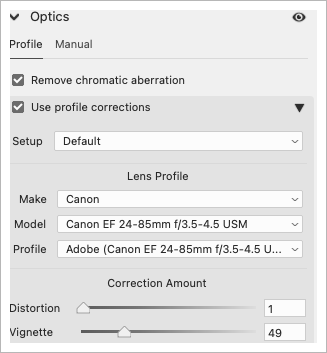
Once you selected the profile (Canon EF 24-85/3.5-4.5), you can adjust the amount of vignetting / removal of vignetting with help of the Vignette slider below in the above chart. Notice that i canceled the distortion correction to 1 - because it is a 300mm lens, not a wideangle lens. You don't want to introduce wideangle correction on images taken with a 300 mm lens.
Unless i find a better profile, i thought this one gave me great results, which then didn't require much further manual corrections in the corners. But since the darker corners are sometimes a bit different from image to image, you may have to move the "vignetting" slider a little bit, in order to give the corners the right balance compared to the rest of the image. |